> ## Documentation Index
> Fetch the complete documentation index at: https://cloud-architect.ipoint-labs.com/llms.txt
> Use this file to discover all available pages before exploring further.
# Amazon CloudFormation S3 URL Stack Challenge
> Hands-on lab · 30m
Launch this lab in the IP Lab Portal, then follow the steps below in the AWS console.
Open IP Lab Portal
## Overview
### Prerequisites
1. Good knowledge of AWS service
* Simple Storage Service (S3)
* AWS CloudFormation: Template and Stack
* LAMP Server
2. Laptop/Desktop
3. Internet Browser
4. Internet connection
### Challenge Instructions
1. **Region** : Make sure to use **us-east-1** region to create all the resources.
2. You will be provided with the requirements of the challenge. If you are new to AWS Cloud, we recommend you go through our hands-on Labs before taking this challenge.
3. **Challenge Duration**: 30 min
### How to submit the challenge
### After building the infrastructure, click on the Validation button, to validate if you have built the required infrastructure and completed the challenge successfully.
* Validation status:
* **Success** - You have completed the challenge successfully.
* **Failed** - You have failed to complete the challenge.
* Once you have successfully validated the challenge, click on **End Lab** button to end the challenge.
### Launching Challenge Environment
### To launch the challenge environment, Click on the Start Challenge button.
* Please wait until the cloud environment is provisioned. It will take less than a minute to provision.
* Once the Challenge is started, you will be provided with **IAM user name**, **Password**, **Access** **Key**, and **Secret** **Access** **Key**.
**Note** : You can only start one challenge at any given time
## Lab guide
### Sign in to AWS Management Console
1. Click on the **Open Console** button, and you will get redirected to AWS Console in a new browser tab.
2. On the AWS sign-in page, leave the Account ID as default. Never edit/remove the 12 digit Account ID present in the AWS Console. otherwise, you cannot proceed with the challenge.
3. Now copy your **User Name** and **Password** in the Lab Console to the **IAM Username and Password** in AWS Console and click on the **Sign in** button.
4. Once Signed In to the AWS Management Console, Make the default AWS Region as **US East (N. Virginia) us-east-1.**
### Cloud Challenge Details
In this challenge, your CloudFormation Stack skills are put to the test. You'll be given a requirement and you have to reach it using your knowledge of S3 bucket, Stack and LAMP Server which will be used in this challenge. This Challenge will help you understand the real-time scenarios.
### Architecture Diagram
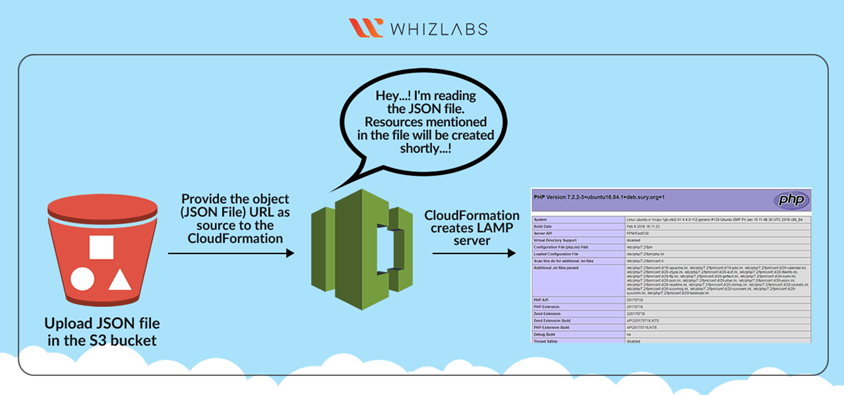 **A company XYZ wants to deploy a simple LAMP server using AWS CloudFormation. They want to do this by using a CloudFormation stack with an S3 Object URL. The below are the tasks that need to be performed by you in order to create the stack.**
1. Create **CloudFormation** Stack:
* Launch EC2 with CloudFormation
* Install **LAMP/ MySQL**
* Configure the Database with CloudFormation.
* Access the **PHP page** in browser.
3. Click on the **Validate** to complete the challenge.
4. **Delete** the resources after Validation.
### End Challenge
1. Sign out of the AWS Account.
2. You have successfully completed the challenge.
3. Click on **End Challenge** button from IP Lab Portal Labs console and wait till the process gets completed.
## What gets checked
When you press **Check my work**, the platform verifies each of these:
* **Create a CloudFormation Stack** — Check whether a CloudFormation stack is created or not.
## Related help
* [FAQs and Troubleshooting](/aws-saa/support/faqs-and-troubleshooting)
* [SSH into EC2 Instance](/aws-saa/support/ssh-into-ec2-instance)
This documentation is built and hosted on [Mintlify](https://mintlify.com), a developer documentation platform.
**A company XYZ wants to deploy a simple LAMP server using AWS CloudFormation. They want to do this by using a CloudFormation stack with an S3 Object URL. The below are the tasks that need to be performed by you in order to create the stack.**
1. Create **CloudFormation** Stack:
* Launch EC2 with CloudFormation
* Install **LAMP/ MySQL**
* Configure the Database with CloudFormation.
* Access the **PHP page** in browser.
3. Click on the **Validate** to complete the challenge.
4. **Delete** the resources after Validation.
### End Challenge
1. Sign out of the AWS Account.
2. You have successfully completed the challenge.
3. Click on **End Challenge** button from IP Lab Portal Labs console and wait till the process gets completed.
## What gets checked
When you press **Check my work**, the platform verifies each of these:
* **Create a CloudFormation Stack** — Check whether a CloudFormation stack is created or not.
## Related help
* [FAQs and Troubleshooting](/aws-saa/support/faqs-and-troubleshooting)
* [SSH into EC2 Instance](/aws-saa/support/ssh-into-ec2-instance)
This documentation is built and hosted on [Mintlify](https://mintlify.com), a developer documentation platform.