

Overview
Prerequisites
- Good Knowledge Of AWS Service
- Lambda Function
- Amazon API Gateway
- Laptop/Desktop
- Internet Browser
- Internet Connection
Challenge Instructions
- Region : Make Sure To Use Us-East-1 Region To Create All The Resources.
- You Will Be Provided With The Requirements Of The Challenge. If You Are New To AWS Cloud, We Recommend You Go Through Our Hands-On Labs Before Taking This Challenge.
- Challenge Duration: 45 Min
How to submit the challenge
- After Building The Infrastructure, Click On The Validation Button, To Validate If You Have Built The Required Infrastructure And Completed The Challenge Successfully.
-
Validation Status:
- Success - You Have Completed The Challenge Successfully.
- Failed - You Have Failed To Complete The Challenge.
- Once You Have Successfully Validated The Challenge, Click On End Lab Button To End The Challenge.
Launching Challenge Environment
- To Launch The Challenge Environment, Click On The Start Challenge Button.
- Please Wait Until The Cloud Environment Is Provisioned. It Will Take Less Than A Minute To Provision.
- Once The Challenge Is Started, You Will Be Provided With IAM User Name, Password, Access Key, And Secret Access Key.
Lab guide
Sign in to AWS Management Console
- Click On The Open Console Button, And You Will Get Redirected To AWS Console In A New Browser Tab.
- On The AWS Sign-In Page, Leave The Account ID As Default. Never Edit/Remove The 12 Digit Account ID Present In The AWS Console. Otherwise, You Cannot Proceed With The Challenge.
- Now Copy Your User Name And Password In The Lab Console To The IAM Username And Password In AWS Console And Click On The Sign In Button.
- Once Signed In To The AWS Management Console, Make The Default AWS Region As US East (N. Virginia) Us-East-1.
Cloud Challenge Details
In This Challenge, Your Amazon API Gateway Skills Are Put To The Test. You’ll Be Given A Requirement And You Have To Reach It Using Your Knowledge Of Lambda Function Which Will Be Used In This Challenge. This Challenge Will Help You Understand The Real-Time Scenarios.Architecture Diagram
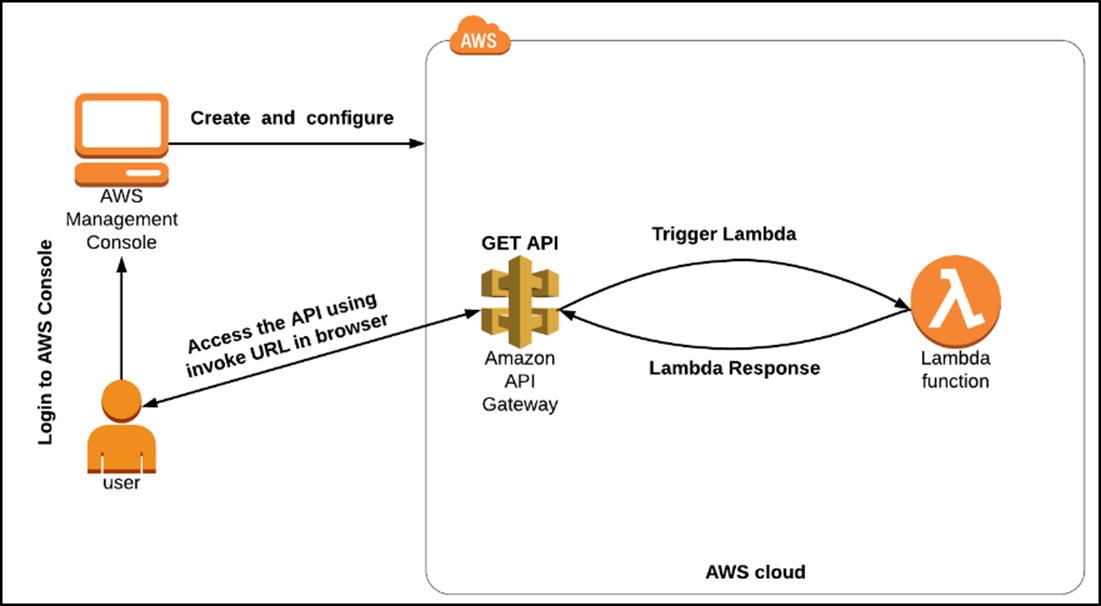
- Create A Function Using Python 3.9 Version Language And Give Required Permissions In AWS Policy Templates To Trigger CloudFront. Note: For the IAM Execution role: choose to use the existing IAM role
- Create An API
- Create A Resource.
- Create A Method.
- Deploy The API.
- Test The API.
- Click On The Validate To Complete The Challenge.
- Delete The Resources After Validation.
End Challenge
- Sign Out Of The AWS Account.
- You Have Successfully Completed The Challenge.
- Click On End Challenge Button From IP Lab Portal Labs Console And Wait Till The Process Gets Completed.
What gets checked
When you press Check my work, the platform verifies each of these:- Create an AWS Lambda Function — Check whether a Lambda Function is created or not
- Create an AWS REST API Gateway with CORS enabled — Check whether a REST API Gateway is created with CORS enabled or not
- Create Resource and Method for API Gateway — Check whether a Resource and a POST method is created or not
- Deploy and Invoke REST API Gateway — Check whether a Rest API gateway is deployed and can invoke the URL or not